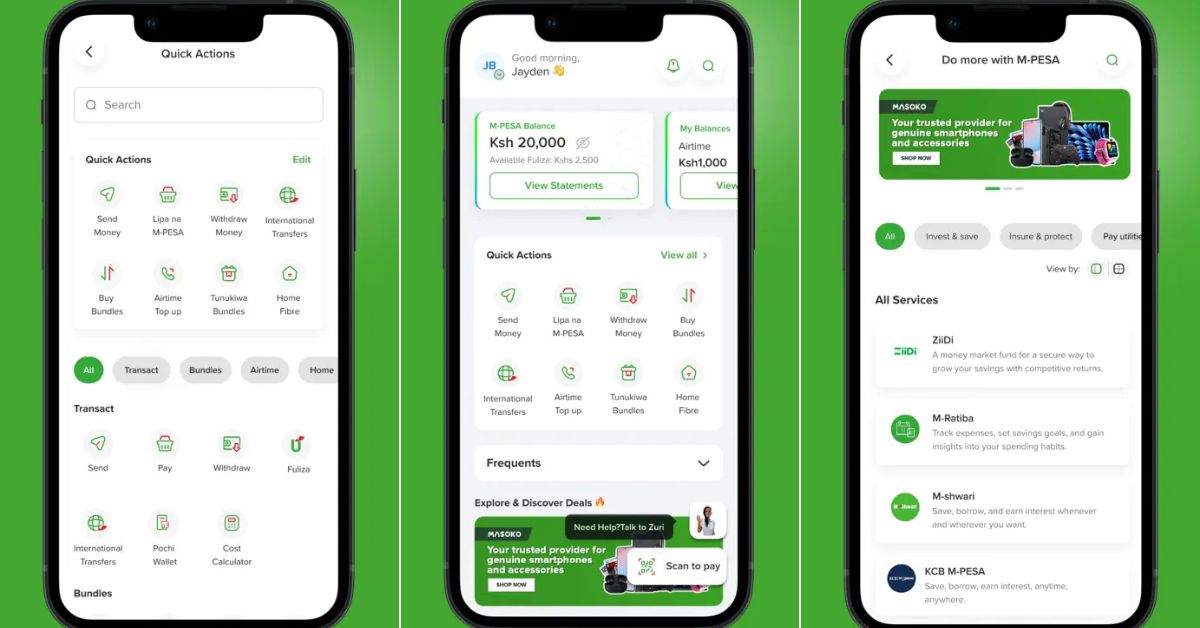
Safaricom’s MyOneApp arrived as the company’s answer to the super app trend, a single platform designed to replace the dedicated M-Pesa app that millions of Kenyans had used for years. The launch places it squarely within Kenya’s fast-moving consumer tech space, where user expectations are shaped by how reliably and quickly mobile money works. On paper, the proposition is clear: consolidate M-Pesa, Bonga Points, Safaricom Home, and other services under one roof. In practice, the transition has exposed a gap between what Safaricom set out to build and what users actually received. This MyOneApp Safaricom review examines the specific changes to the user experience, documents what was gained and what was lost, and explains why this app has become one of the most discussed consumer releases in Kenya.
Table of Contents
The App That MyOneApp Replaced
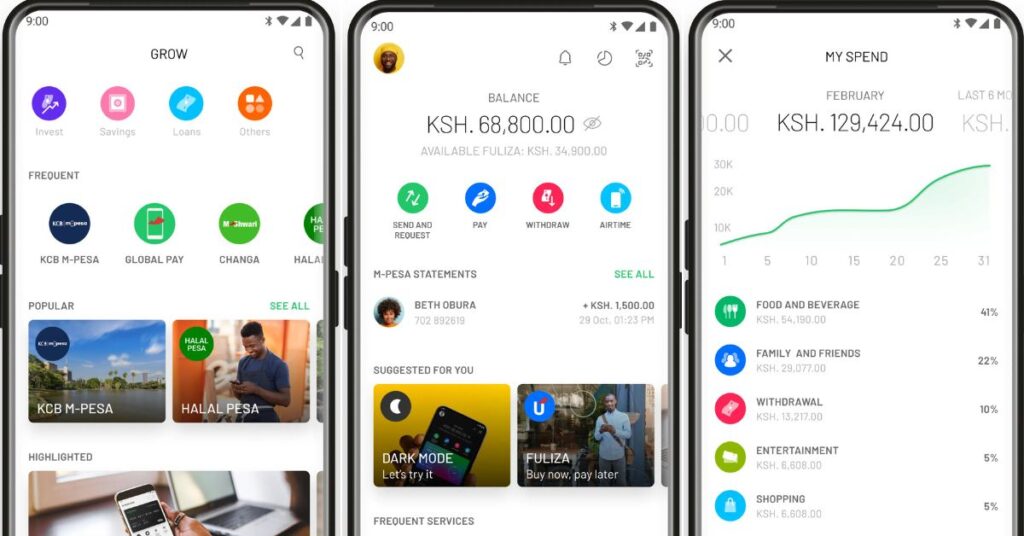
The M-Pesa app was not a perfect product, but it had a clear and disciplined purpose. Launched as a mobile interface for Kenya’s most widely used mobile money service, it was built around a single category of tasks. Sending money, withdrawing cash, checking a balance, paying bills, and accessing products such as Fuliza, M-Shwari, and KCB M-Pesa were all reachable within a few taps from the moment the app opened.
By the early 2020s, M-Pesa had grown to serve over 30 million active users in Kenya, according to Safaricom’s published annual reports. The app served this base with a focused, predictable interface. Users knew where to find what they needed because the app was not trying to be anything other than a financial tool. That clarity, it turns out, does not transfer easily when you expand the scope to include eight other Safaricom product categories.
The app also carried a relatively small footprint, which mattered in a market where many users are on devices with limited storage and modest processing power. For an app whose most common task is completing a money transfer in under a minute, speed and simplicity were not incidental qualities. They were the product.
What Safaricom Set Out to Build
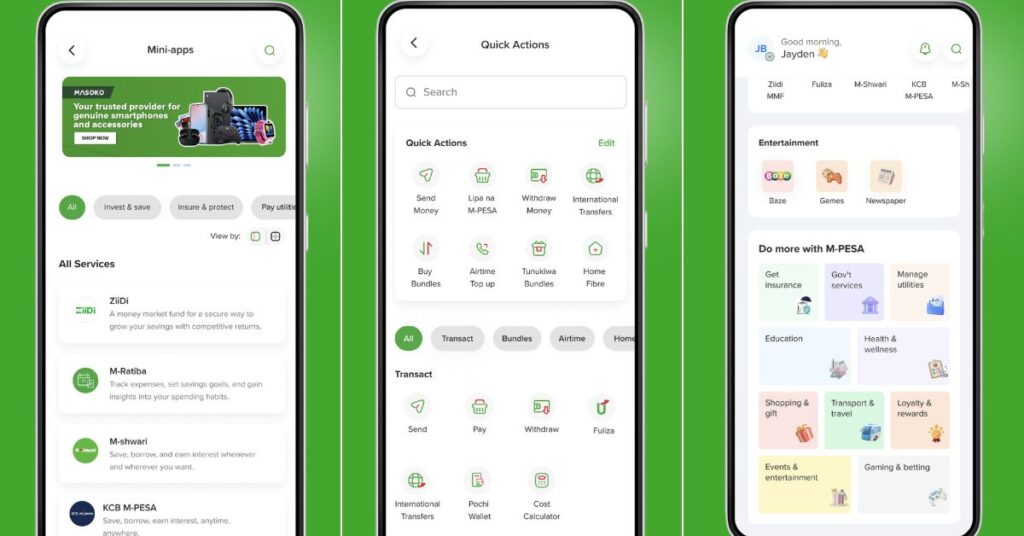
Safaricom’s stated goal for MyOneApp was to bring its full range of services into a single application. The app bundles M-Pesa transactions, Bonga Points management, Safaricom Home broadband services, the Nane Nane self-service platform, business tools, entertainment, and several other features into one interface.
In Safaricom’s communications ahead of the transition, the company described MyOneApp as a move toward a connected digital ecosystem. The super app model, established in Asia through WeChat in China and Grab in Southeast Asia, aims to increase engagement by making one application the default interface for multiple areas of daily life. For a company with Safaricom’s reach in Kenya, the commercial rationale is straightforward: more services on one platform means more user sessions, more data, and more opportunities to cross-sell.
None of that reasoning is flawed on its own. Super apps can, when well executed, deliver genuine value to users who would otherwise manage six separate applications. The challenge has been in how the transition was handled and how the interface was structured around Safaricom’s product portfolio rather than around the user’s most frequent tasks.
Where the Experience Falls Short
Navigation and the Cost of Extra Steps
The most consistently raised complaint about MyOneApp is that tasks that previously required two or three taps now require more. On the dedicated M-Pesa app, sending money meant opening the app, selecting the relevant function, entering a recipient and amount, and confirming. In MyOneApp, the same journey runs through a home screen shared with multiple other Safaricom service categories before the user reaches an equivalent entry point.
This is not a minor convenience issue. User interface research consistently shows that each additional step in a task flow increases the likelihood of user frustration and task abandonment. For a tool that many Kenyans open several times a day, primarily for short and time-sensitive transactions, added navigation depth is a genuine regression. A person paying a boda boda rider, settling a bill, or sending money urgently does not benefit from a home screen that simultaneously surfaces Safaricom TV packages and broadband upgrade prompts.
Performance on the Devices Most Kenyans Actually Use
Kenya’s smartphone market is dominated by mid-range and entry-level handsets. According to the Communications Authority of Kenya, mobile data subscriptions in Kenya have grown to tens of millions, the large majority of which are active on devices that are not optimised for data-heavy or resource-intensive applications. A super app, by its nature, carries more code, more assets, and more background processes than a single-purpose tool.
Users with devices in the lower-to-mid price range have consistently reported slower load times and occasional instability on MyOneApp compared to the M-Pesa app it replaced. While device performance varies, the pattern of feedback across user reviews suggests the app’s baseline resource demands are misaligned with the typical Kenyan smartphone. An app that is slow to open is a meaningful problem when the core use case is transacting quickly and often on a limited data plan.
Features That Are Now Harder to Find
A comparison of the old M-Pesa app and MyOneApp shows that several frequently used features were relocated or placed deeper within expanded menus. Lipa na M-Pesa, one of the most used functions for paying at businesses and to service providers, moved from a prominent top-level position to a location that first-time users of the new interface frequently struggle to locate. Transaction history, which matters both for personal budgeting and for small business record-keeping, follows a similar pattern.
The structure of the new interface creates a predictable problem. When a home screen is designed to surface eight product categories with equal visual weight, primary functions compete for space with secondary features. The result is a layout that serves Safaricom’s product portfolio evenly rather than prioritising the user’s most frequent tasks.
Table 1: Feature comparison between the dedicated M-Pesa app and MyOneApp
How the Transition Was Managed
One aspect that compounded user frustration was the manner in which the switchover was handled. Users of the M-Pesa app found themselves directed to download MyOneApp without a detailed explanation of what was changing or how to locate familiar functions in the new interface. The Play Store listing for the M-Pesa app was progressively updated to redirect to MyOneApp, making the transition effectively mandatory for anyone who wanted to manage M-Pesa through a dedicated app.
There was no phased rollout allowing users to opt in gradually, no in-app walkthrough mapping old features to their new locations, and no option to continue using the previous interface while adjusting to the new one. A more considered transition process, including a guided first-launch flow and clear communication about what changed and why, would have substantially reduced the initial wave of complaints that followed the launch.
What App Store Reviews Reveal
App store reviews are imperfect data. They skew negative because satisfied users rarely take time to leave written feedback, and they reflect a self-selected group rather than the entire user base. With that caveat on record, the pattern of reviews for MyOneApp on the Google Play Store and the Apple App Store reflects recurring themes that align closely with the issues outlined in this piece.
Table 2: Common complaint themes from user reviews on the Google Play Store and Apple App Store
Safaricom has released multiple updates to MyOneApp since launch, which suggests the product team monitors user feedback and is working to address reported pain points. Some of the earlier performance issues have been partially improved in subsequent versions. However, the core navigation and information architecture issues reflect design decisions rather than bugs, and those require more significant changes than a routine update can deliver.
The Business Logic Behind MyOneApp
Understanding why Safaricom built MyOneApp the way it did requires looking at the company’s commercial position. Safaricom is a publicly listed company with shareholders who monitor metrics including daily active users, session length, and cross-product conversion rates. A super app serves all of these figures more effectively than a single-purpose financial tool.
The WeChat and Grab model has demonstrated that when users stay within one application for longer periods, they are more likely to engage with adjacent services. Safaricom has products in mobile lending, insurance, broadband, and entertainment that need discoverability among its existing base. Bundling them with M-Pesa, which already serves over 30 million active users, is the most direct route to that exposure. For more on how Kenyan companies are navigating digital product strategy, see our ongoing coverage of Kenya’s digital landscape [EDITOR: Replace this link with a published related article when available].
The problem is that this strategy only holds when the core product retains the quality it had before bundling began. When consolidation degrades the primary user experience, which for the vast majority of MyOneApp users is sending and receiving money, the additional revenue opportunities from cross-selling are offset by user frustration and a gradual erosion of trust in a product that Kenyans rely on daily. A super app that makes mobile money harder to use has undermined its own most valuable asset.
What a Better Implementation Would Look Like
A well-executed super app does not bury its most-used features. It surfaces them prominently while making secondary services available without inserting them into the primary user journey. WeChat, frequently cited as the benchmark for super apps globally, keeps its core messaging and payment functions reachable from the bottom navigation bar while housing other services in a clearly labelled and optional section. The user decides whether to explore the wider platform. The app does not force that exploration.
For MyOneApp, the solution does not necessarily require rebuilding from scratch. It requires honest prioritisation based on usage data. If the majority of users open the app to send money, check a balance, or make a Lipa na M-Pesa payment, those functions should be the first things visible, reachable in the fewest possible steps. Supporting services can live one layer below, accessible but not competing with the primary task.
Safaricom has the engineering capacity, the user data, and the market position to make those corrections. The answer to whether user experience or engagement metrics will carry more weight in the next major design cycle will determine whether MyOneApp eventually becomes the useful, unified platform it was intended to be.
Frequently Asked Questions (FAQ)
What is MyOneApp and how does it differ from the old M-Pesa app?
MyOneApp is a super app developed by Safaricom that combines M-Pesa, Bonga Points, Safaricom Home, and other company services into a single application. It replaced the dedicated M-Pesa app, which handled mobile money functions exclusively. The key distinction is scope: the old app focused on one task category and did it simply, while MyOneApp attempts to cover multiple Safaricom products within a shared interface.
Why did Safaricom phase out the M-Pesa app in favour of MyOneApp?
Safaricom’s stated objective was to create a unified platform, following the super app model that has proven commercially successful in Asia. The business case centres on increasing the discoverability of Safaricom’s broader product range, raising daily active user metrics across multiple services, and reducing the need for customers to switch between separate applications. The dedicated M-Pesa app served mobile money well but left other Safaricom products under-exposed.
What are the most reported problems with MyOneApp?
The most consistently reported issues are increased navigation depth to reach common M-Pesa functions, slower performance on mid-range and entry-level devices, and the relocation of frequently used features such as Lipa na M-Pesa and transaction history into deeper menu levels. The absence of a guided onboarding flow during the transition from the M-Pesa app added to the initial confusion many users experienced.
Has Safaricom addressed the complaints about MyOneApp?
Safaricom has issued multiple updates to MyOneApp since the launch, and some of the earlier stability and performance issues have shown improvement in subsequent versions. The structural issues with navigation and information architecture, however, are tied to core design decisions rather than technical bugs and have not been reversed in updates released up to the time of this review.
Can I still use M-Pesa without MyOneApp?
Yes. The M-Pesa USSD service remains available on all Safaricom lines as an alternative for basic transactions such as sending money, checking a balance, and making payments, without requiring the MyOneApp application. For users who find the app difficult to navigate, USSD provides a reliable fallback that works on any handset, including those without a smartphone.